%20(1).png?width=400&height=224&name=New%20ACBR%20logo%20(2)%20(1).png "ACBR Atlanta Commercial Board color logo")

Access ACBR Forms on Propdocs
We’re excited to announce a partnership that provides all ACBR members with a free subscription to Propdocs, including access to the complete ACBR Forms Library in both fully editable (unbranded) and restricted (ACBR-branded) formats.
ACBR members receive a free Basic Propdocs subscription, which includes:
- Up to 250 deals per year
- Unlimited documents
- Unlimited eSignatures
- Unlimited team members
Features:
- Track changes
- Version comparison
- Public and private comments
- Built-in eSignature
- Activity notifications
- User permissions
- Template management (Premium subscription)
- Clause library (Premium subscription)
- Multiple workspaces (Premium subscription)
ACBR members can also receive 25% off their first year of a Premium subscription with code ACBR25.
Upgrade to Propdocs Premium to access the additional features listed above or if you need more than 250 deals per year.
Get Started
- Click Sign Up/Login to create your free account, then enter your work email address.
Note: The email used for your Propdocs account does not have to be the same as your ACBR membership email address. - Check your email and click the verification link to complete the signup process.
Request Access to ACBR Templates
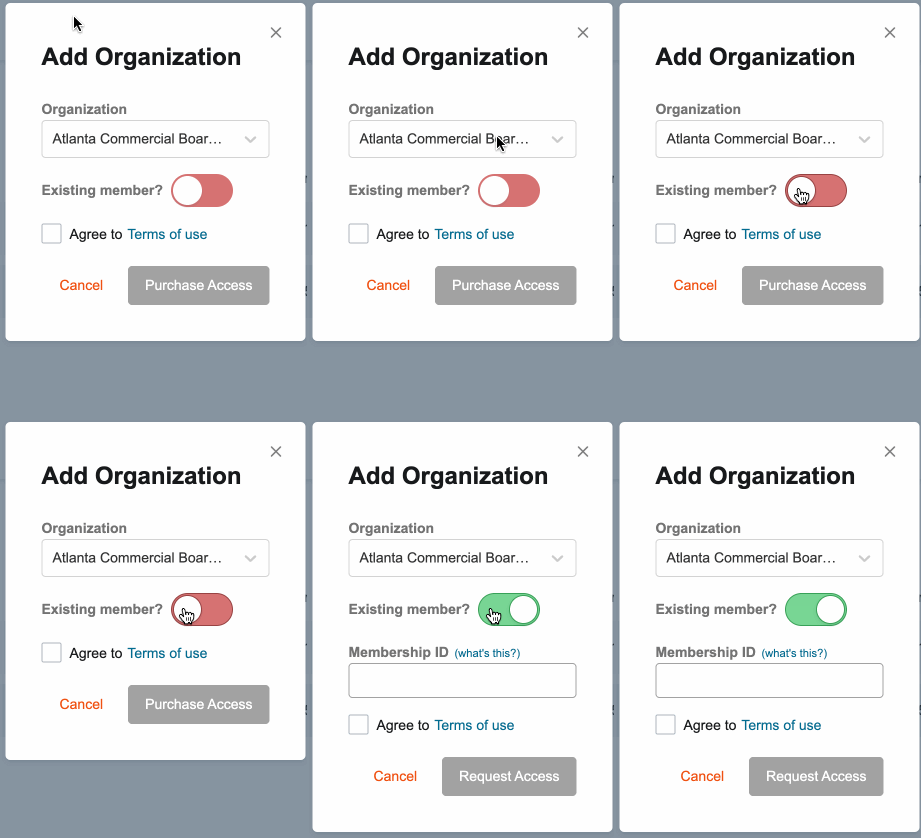
- After signing up, open the menu on the left side of your Propdocs account, click Settings, and then click Organizations.
- Click the Add Organization button at the top right of the page.
- Select ACBR as the organization.
- Select Existing Member.
- Enter your atlcbr.com username (look up your username).
- Check the box to agree to ACBR's Terms of Use.
- Click Request Access.
Next Steps
If your access request is approved, which usually takes only a few seconds, you’re good to go. You now have an active Basic subscription to Propdocs. Click Deals to begin creating deals and using ACBR templates.
Questions?
Chat with Propdocs during business hours using the support widget in the bottom-right corner of your Propdocs account, or submit a request through the Propdocs support page.